For those not familiar, Microsoft Stream is part of Office 365 and is essentially “Enterprise YouTube”. If you do cloud meeting recording in Microsoft Teams, it will end up in Microsoft Teams, and automatically be permissioned for the people in the meeting from within your organisation to have access to it.
Stream has a concept of channels and groups
- Microsoft Stream groups are connected to an Office 365 group as an easy way to organize who has permission to see and edit your videos and channels. Each Office 365 group will also be a group on stream. So channel meetings recorded in teams will end up in the same stream group.
- Channels are more like YouTube channels, you create them as a collection of videos on a topic. You can create a channel within a group, or create a companywide channel
If you upload a video and later want to add it to a channel or group or record an Outlook scheduled Teams meeting (which by default creates a recording, not in any group or channel), you can later add it to one or multiple groups and channels.
So by default, an Outlook recorded teams meeting is “Limited” to be viewed by just the company members invited to that meeting:
![image_thumb[2]](http://tomtalks.blog/wp-content/uploads/2018/10/image_thumb2.png "image_thumb[2]")
Under the ellipsis (three dots) you can see Add to group/channel
![image_thumb[17]](http://tomtalks.blog/wp-content/uploads/2018/10/image_thumb17.png "image_thumb[17]")
![image_thumb[16]](http://tomtalks.blog/wp-content/uploads/2018/10/image_thumb16.png "image_thumb[16]")
Adding to groups will work here, but if you try to find channels they will not be found.
![image_thumb[15]](http://tomtalks.blog/wp-content/uploads/2018/10/image_thumb15.png "image_thumb[15]")
to share a video to a channel you must first open the video permissions up to all of the organisation:
Edit
![image_thumb[9]](http://tomtalks.blog/wp-content/uploads/2018/10/image_thumb9.png "image_thumb[9]")
![image_thumb[10]](http://tomtalks.blog/wp-content/uploads/2018/10/image_thumb10.png "image_thumb[10]")
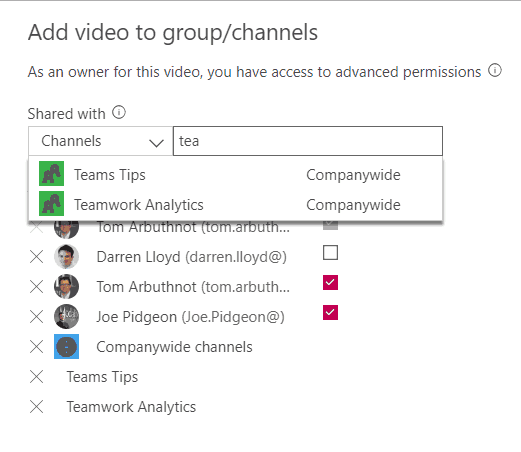
You will now be able to add the video to one or more company-wide channels
![image_thumb[14]](http://tomtalks.blog/wp-content/uploads/2018/10/image_thumb14.png "image_thumb[14]")
Is there a way to have a recorded meeting video automatically be added to a channel that will automatically pop up in my existing channel tab in MS Teams? Currently feels like a lot of clicks to get the video into that channel – can the channel from stream be linked with the channel from Teams? Thx