If for whatever reason you want to force Skype for Business to join in the web browser experience rather than “popping” the full client, you can do the following
Copy the URL from the meeting invite:
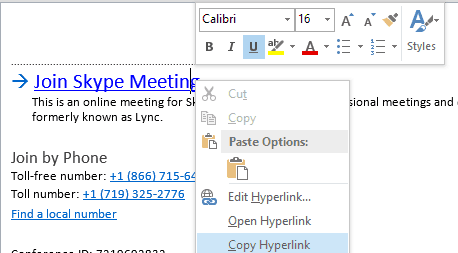
Paste the URL and append ?sl=1
https://join.microsoft.com/meet/bobsmith/FCZMMC7?sl=1
The meting will not pop the full client and you can install the small plugin for a full audio/video experience

How do you force it to open in the Skype for Business Client ?
I’ve got meetings with the standard “Join Skype Meeting” link, that always pops the meeting in the web browser, which I never want to do. I always want the client popped otherwise I go through the slower process of waiting for it to pop in the browser, then selecting
“Use my Skype for Business desktop app instead” … with the number of meetings I have it’s just extra delay and clicks which are not required.
Of the 3 links below (names removed) the first one ALWAYS pops in the browser, the other two always in the client. They are all from the same company, my company, the first two are other people’s links, the third is my one of my own meeting links.
How is this decision determined ? It’s driving me mad!
https://meet.lync.com/company-com/name.surname/0457KK2G
https://meet.lync.com/company-com/name.surname/RYGQRKTP
https://meet.lync.com/company-com/name.surname/70B3J0JW
Thanks
Gav
Select the diary entry you would like to join via skype. On the ribbon a new option to “Join Skype Meeting” is available. Click and away you go.