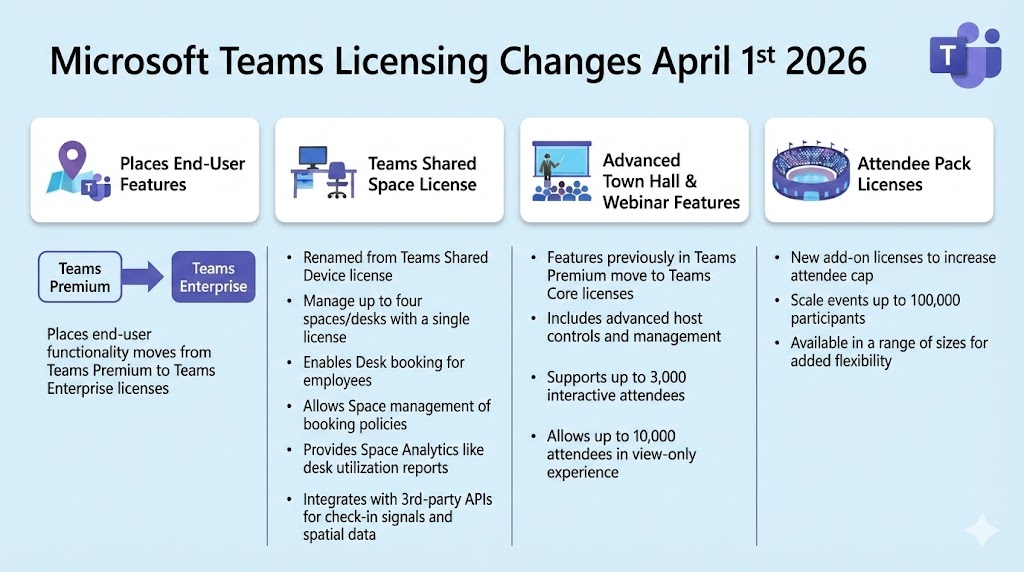
On January 22nd, 2026, Microsoft announced licensing changes for Microsoft Teams and Microsoft Places that will take effect on April 1st 2026.
Recently licencing announcements have meant price rises, but in this case, more features and value are actually being brought into the core Teams licence.
A quick recap on Microsoft Teams licensing
Microsoft Teams User Licences:
- Teams Enterprise – Microsoft Teams was separated from the Microsoft 365 suite and released as a stand-alone product (that you can optionally buy alongside your M365 suite licence). That product is called Teams Enterprise. It is the core capabilities of Teams you get as a standard enterprise user, and what is typically bought or included with the M365 suite. You might hear it referred to as “Teams Core” ($5.25 PUPM)
- Microsoft Teams Premium – A collection of additional Teams features available as a per-user-per-month add-on ($10 PUPM)
- Microsoft Teams Phone – the per-user add-on licence to add phone capabilities ($10 PUPM)
- Microsoft 365 Copilot – While not specifically a Microsoft Teams licence, this licence unlocks advanced AI capabilities across the Microsoft 365 suite, including Teams. Most AI capabilities in Teams will require the Microsoft 365 Copilot user licence. With a notable exception: Intelligent Meeting Recap is included in Teams Premium and in the Microsoft 365 Copilot licence. ($21 PUPM Business, $30 PUPM Enterprise)
Audio conferencing is technically available as a separate licence too, butis now included in most of the suites
I mostly focus on business/Enterprise, but for completeness, there is also Microsoft Teams Essentials – a standalone Teams-only SKU for SMBs. Includes meetings up to 30 hours, 300 participants, 10GB cloud storage per user
Microsoft Teams Device and Space Licences:
While personal devices, such as personal IP Phones, don’t need any additional licences. Shared devices require:
- Microsoft Teams Rooms Basic and Teams Rooms Pro – The add-on licences for Teams rooms basic being free for up to 25 rooms, Teams Rooms Pro is ($40 PRPM)
- Teams Shared Devices license – previously called Common Area Phone (CAP) license, and as of this announcement, is being renamed to Teams Shared Space license. ($8 PM)
Places end-user features move from Teams Premium into Teams Enterprise
The wording of the announcement is a bit verbose here, but essentially, end-user Places features will be available to pretty much everyone with a Microsoft 365 licence. Previously, these required Teams Premium.
“We are expanding access to end-user functionality in Places by making it available in all licenses that include access to the calendar in Outlook and Teams (including Microsoft 365 E3, E5, Business Basic, Business Standard, and Business Premium; Outlook 365 E1, E3, and E5; Exchange Online; various Teams licenses; additional Microsoft 365 and Office 365 licenses).”
I understand it also includes the A, education licences. But not any F, frontline worker licences.
Previously, Microsoft Places was part of Teams Premium. You bought the user a Teams Premium licence, and that user could access the Places features for as many offices, spaces, rooms and desks as you enrolled in your environment globally.
Now it moves to a model where all the end-user features are included in the core licence, but there will be an incremental cost for those spaces and desks (see below).
Key Microsoft Places end-user features include:
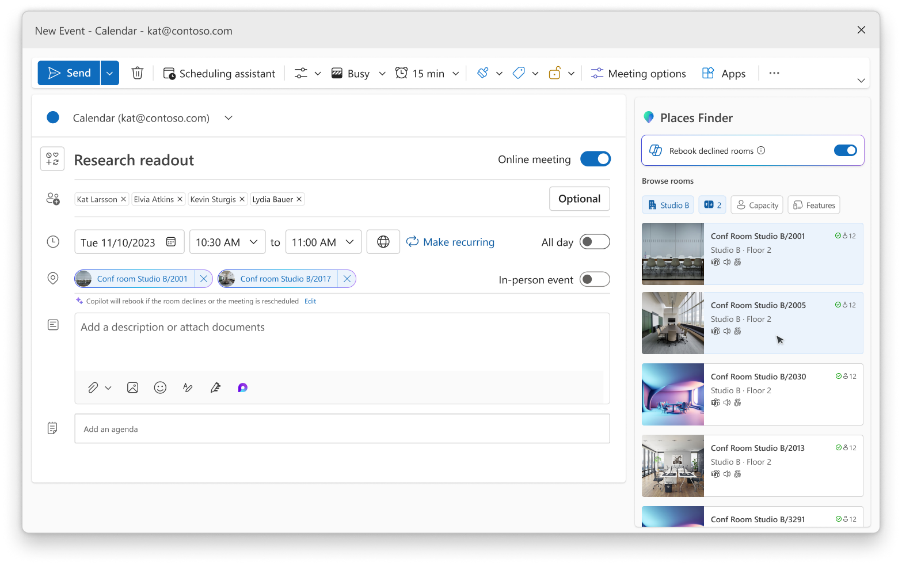
Places Finder: Make more informed decisions about bookings with enriched context like images, floorplans, custom attributes, and available technology in the spaces around you. This change enables organisations to upgrade at scale from Room Finder to the full Places Finder experience by onboarding spaces to the Places Directory.
Places Explorer: Enable map-based space reservations and explore details about all workplaces, including the people, spaces, and experiences in each location. Access to Places Explorer is through the Places app inside Microsoft Outlook and Teams.
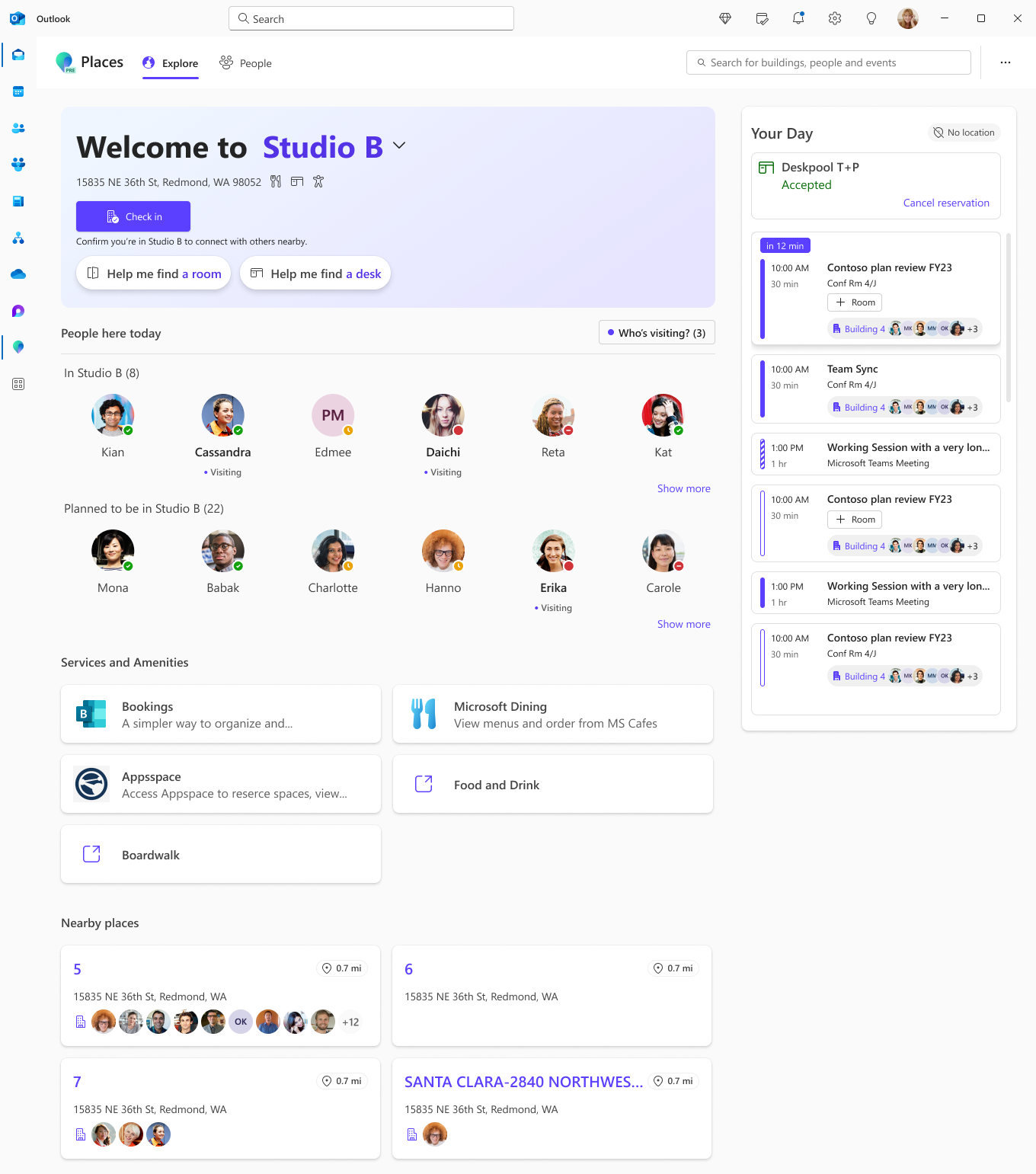
This also includes building-level check-in via manual confirmation, peripheral check-in, and upcoming wi-fi based check-in.
You can find out all the latest about Microsoft Places features and roadmap in a recent briefing Microsoft Places in 2026: APIs, Desk Booking, and Copilot Context with
Brennan McReynolds, Product Strategy Lead for Microsoft Places
Also, much like Microsoft Teams, some Microsoft Places AI features require the end user to have the Microsoft 365 Copilot licence:
- Managed room booking – Copilot recommends rooms based on various factors and rebooks rooms if there’s a conflict
- Space analytics with Copilot – AI analysis explaining key data points and trends, comparing utilisation metrics against previous periods
Teams Shared Space license (formerly Teams Shared Devices license)
The Teams Shared Devices license, as the name suggests, was previously for licensing shared or standalone devices: common area phones, Teams Displays (now deprecated), Teams Panels for rooms without a Teams Room and SIP Phones.
The Microsoft Teams Shared Devices license includes the following service plans – Teams, Teams Phone (Phone System), Entra ID P1, Intune, and Exchange Online Plan 2 (only to support cloud voicemail – email and calendar aren’t supported)
Teams Shared Devices license will be renamed to Teams Shared Space license adds the ability to manage up to four desks with a single license, for the following Places functionality:
- Desk booking: Employees can reserve desks in advance before arriving at a location.
- Space management: Admins can manage spaces in their Places Directory, including the modes, properties, booking and auto-release policies for rooms and licensed shared spaces (desks).
- Space Analytics: Inventory and utilisation reports are available for licensed shared spaces (desks).
- Integration with 3rd-party APIs: Places can integrate with 3rd-party sources of spatial data, floor plans, and check-in signals, streamlining the onboarding and management of spaces in the Places Directory – e.g., if you have a desk or dock, plugging in or badging in as the signal that it’s in use.
So, for example, if you had a meeting room without a Microsoft Teams Rooms in, a single Microsoft Teams shared space licence would cover you for:
- Making the room bookable with the advanced features in Places,
- Manage the space in the Places Directory, including the modes, properties, booking and auto-release policies
- Reporting on room usage analytics (based on bookings in exchange and or sensors in the room)
- A Microsoft Teams Panel outside the Room
- A common area phone in the room (if you wanted one)
- If there were a BYOD meeting room device in the room, you would get usage analytics reporting on that device via Teams on the user’s laptop.
If you just want to make desks bookable and report on them, one Teams Shared Space license covers four desks.
Under the old Microsoft Places licensing, included in Teams Premium. Teams Premium users could book, and admins could report on, as many rooms, spaces, and desks as the organisation wanted, as long as they were enrolled in the system, with no incremental cost per space.
This flips the model around, where now the incremental cost is based on how many spaces and desks you bring into the system, which I think is a better model, as many organisations have many more users than bookable spaces. Also, now the booking experience is uniform for all users.
I’m curious, during this transition,n how it works for a customer that’s bought say 200 Teams Premium licences and is using Places, so today those users can book whichever spaces. From April 1st, all core users get the ability to book spaces with Places, but only if those spaces are also licensed with a team shared space licence?
This license will be available on April 1, 2026. Customers with legacy Teams Shared Device licenses, admins will not be required to take any action to transition to this license, but will have to assign an additional no-cost license to spaces, like desks, to take advantage of the new features.
Advanced town hall and webinar features previously in Teams Premium license moving to Teams Core
This one is great news. The Teams Town Hall and webinar story has really advanced but a lot of the best features required Teams Premium. Now they will all be available to all Teams core (Enterprise) users, including:
- Meeting theme and email customization: Use organizational branding to customize the event-related artifacts that are delivered to attendees.
- Enterprise Content Delivery Network (eCDN): eCDN helps to manage the bandwidth load of streaming events to large audiences, providing stability and reliability.
- Streaming chat: Chat for town hall events reduces any message sending lag, enabling smoother communication between attendees and organizers.
- Reactions interactivity: Enjoy the same reactions from Teams meetings in town hall and webinar, allowing the audience to express themselves and react to presented content.
- Real-time event insights: Hosts of town hall and webinar instances can get feedback on the performance and reliability of their broadcasts, helping to ensure a smoother experience for attendees.
- Immersive events in Teams: Host immersive experiences in custom 3D environments where attendees join as avatars to interact and collaborate.
Webinars and town halls can be up to 3,000 interactive attendees, as well as up to 10,000 attendees in a view-only experience.
The only slight loss in this change is that previously Teams Premium included up to 50,000 attendees and up to 100,000 attendess in preview.
Now new attendee pack licenses allow increasing the cap on the total number of attendees up to 100,000. Attendee pack licenses will come in a range of sizes to provide added flexibility, and will be available to assign through the Teams Admin Center (TAC) – no pricing details yet. Attendee packs allow unlimited events for the duration of the licence. It’s not clear if these will be offered in monthly or annual licences yet.
Microsoft Teams Premium Remains
Despite pulling advanced webinar and town hall and places features out of Teams Premium, Microsoft will continue to offer and invest in Teams Premium and make the case that there is still lots of value in it for certain users.
Teams Premium will still be the licence for:
- Advanced Meeting Protection Enhanced security features including end-to-end encryption enforced through sensitivity labels, watermarking that displays attendee email addresses on shared content and video feeds, and the ability to restrict participants from copying or forwarding meeting chat messages, live captions, and transcripts. Organizers can also require unverified participants to verify their identity via email passcode before joining.
- Intelligent Meeting Features AI-powered Intelligent Recap provides personalised meeting summaries with AI-generated notes, action items, and mentions. Live translated captions support translation into multiple languages during meetings, and live translated transcripts help participants follow along in their preferred language.
- Advanced Administrative Tools – Custom user policy packages, advanced collaboration analytics showing external collaboration habits, real-time telemetry with 7-day retention, and proactive alerts for audio, video, and screen sharing quality issues during in-progress meetings.
- Queues App for Teams Phone A Teams-native solution for managing call queues and auto attendants, featuring real-time metrics, historical reporting, and Monitor/Whisper/Barge/Takeover capabilities for supervisors to coach agents during live calls.
- Enhanced Bookings and Virtual Appointments Advanced capabilities including SMS text notifications for appointment reminders, a queue view for managing scheduled appointments, and detailed consumption and usage analytics.
- Meeting Personalisation Custom organisation meeting backgrounds, branded meeting themes applied to invites and lobby screens, custom meeting templates for consistent experiences, and RTMP-In support for producing meetings from external encoders.
Full list of current Teams Premium features, please click here.
Be First to Comment