Office 2016 Click-To-Run offers a number of channels (or branches) to allow you to test new features. Insider Fast is the earliest public channel, so as such is unsupported, features might not work, features might come and go, are subject to change, so this is not generally available. If you are unsure, then you probably shouldn’t be running this Channel.
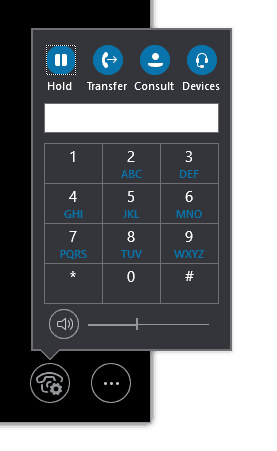
What Insider Fast gives us is an early view of what might be coming, and one of my esteemed colleagues Rick Eveleigh noticed that on Insider Fast there is now a consult transfer button in Skype for Business.
When you hit Consult Transfer, you can choose a SfB User or put in a phone number
![clip_image001[9]](http://tomtalks.blog/wp-content/uploads/2017/01/clip_image0019.png "clip_image001[9]")
When you choose a SfB User, it defaults to an IM window
![clip_image001[11]](http://tomtalks.blog/wp-content/uploads/2017/01/clip_image00111.png "clip_image001[11]")
You can then escalate to voice and hit the transfer button (interestingly there is no option to IM, then hit the transfer button, notice above it does not appear)
![clip_image001[13]](http://tomtalks.blog/wp-content/uploads/2017/01/clip_image00113.png "clip_image001[13]")
Once you have transferred it briefly shows you transfer complete (ignore the name, screenshot from a different test)

If you input a phone number, non-SfB number it acts more like a “normal” consult transfer. First, you speak to the C Party (transfer target), then when you hit the transfer button the B and C parties are joined.
![clip_image001[17]](http://tomtalks.blog/wp-content/uploads/2017/01/clip_image00117.png "clip_image001[17]")

In all cases Back to call returns you to the original call.
I also noticed a new style toast in this build:
![clip_image001[15]](http://tomtalks.blog/wp-content/uploads/2017/01/clip_image00115.png "clip_image001[15]")
Again, this is a very early build, things might come/go/change, but hopefully, we’ll see this feature in the Current channel soon.
I think the button to complete the transfer is not obvious enough, tucked away top right, but the feature is looooong overdue and most welcome!
I tend to agree, it could be a bit clearer, also one button as text and another as an icon is a little odd, hopefully, there is more polish to come
I just tested this in Cloud PBX (albeit the call came through our on-prem infrastructure) and I did see the Consult button available.
Did the button work, I see the button but clicking it causes no action to take place. Maybe it was just me though
A faster way than elevating from an IM to call is to click the dropdown menu on the contact during the transfer stage, then select “Skype Call”
Do you think that the Consult button will be updated in Skype for Business 2015 by way of an update?
Great question. some features do get back ported, but not many, I have no insider knowledge but would guess this is not high on the priority list
Hello Tom,
What are prerequisites for Consult button?
Works for Lync 2013 onprem or S4B online only?
Does this functionality also works for the skype for business 2013 client on premise
No, it’s only 2016 Click to Run I’m afriad
Hi Tom – can you confirm whether consultative transfer shoudl appear if I am running A2 licenses through SFB online – if so what Proplus / SFB versions need to be deployed?
Thanks!