The new features and improvements to Microsoft Teams keep flying in, here are 9 new updates for July.
Live events in Microsoft Teams for up to 10,000 attendees
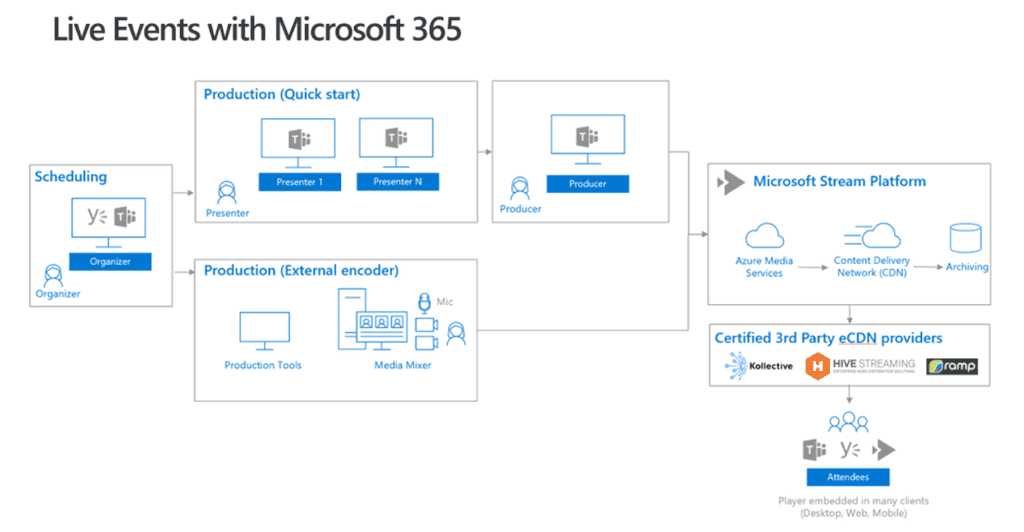
Microsoft Teams live events is now in public preview, allowing users to plan, produce, and broadcast events right in Microsoft Teams.
A live event delivers one-to-many video and content streaming to a large online audience while providing centralized control of the shared attendee experience. Live events now empower every organizer, from Microsoft Teams users all the way to webcasting professionals. Attendees can join the experience where they are: through Stream, in Yammer or in Teams.
How to enable: https://docs.microsoft.com/en-us/MicrosoftTeams/what-are-teams-live-events
Share a PowerPoint into a meeting rather than desktop sharing
This is more bandwidth efficient than desktop sharing.

In a meeting click share:
- The PowerPoint section lists the most recent files you’ve opened or edited in your team SharePoint site or your OneDrive. If you select one of these files to present, all meeting participants will be able to view the slides during the meeting. Their access permissions to the file outside of the meeting won’t change.
- If you select Browse and choose to present a PowerPoint file that hasn’t been uploaded to Teams before, it will get uploaded as part of the meeting. If you’re presenting in a channel meeting, the file is uploaded to the Files tab in the channel, where all team members will have access to it. If you’re presenting in a private meeting, the file is uploaded to your OneDrive, where only the meeting participants will be able to access it.
Translate chat messages
The world is our workplace here at Teams, so we’re loving this feature. At the top of a message, select More options  > Translate to get an instant translation of the message into the language you’ve set for Teams! Très cool.
Mark has done a great post on how to enable this here: https://blog.valeconsulting.co.uk/2018/07/18/microsoft-teams-adds-message-translation-here-is-how-you-turn-it-on/


Send code snippets in a message
You’re now able to create and share a snippet of code right in a chat or channel message. Get syntax highlighting, auto-indentation, and text wrapping control, all in the programming language of your choice! To try it, look under the compose box, then select Format Expand button > Code snippet </>.


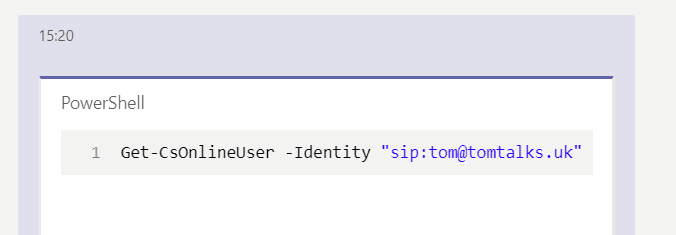
Get important notifications while in Do not Disturb mode
Even when you need to set your status to Do not disturb, there are still some calls and 1:1 chats you don’t want to miss. You can now give priority access to certain people or numbers, from bosses to besties. This means you’ll get notifications about calls and 1:1 chats from these people while you’re set to Do not disturb. To set it up, click your profile pic > Settings > Privacy and follow the prompts.

Bring your Skype for Business contacts to Teams
When your organization moves from Skype for Business to Teams, your contacts will make the move with you. To see them, once you’re in Teams, click Chat on the left, then Contacts at the top.

Updated keyboard shortcuts for Microsoft Teams

Join a team with a code
Send people a code to join your team— Next to a team name, click More options > Get link or code and follow the prompts. Tell people to click Join or create a team at the bottom of their teams list, then plug the code into the Join a team with a code box at the top. This works with public and private teams.
Up to 250 participants in meetings
Moving up from 80 to 250, the same as Skype for Business
Thanks for great updates on Teams.
Do you know when it will be possible to call virtual meeting rooms, like pexip?
Hi Lars,
Not yet, but it’s coming very soon
Hi Lars, this will not be possible with our integration with Microsoft Teams as we are co developing this with Microsoft. We must maintain the Microsoft Teams Meeting experience. As part of a future release, we are planning on bringing the ability to do Microsoft Teams User > VTC device directly, so P2P calls.
Hi, as far as i can see, external SfB contacts don’t work in Teams. Do you know when this feature is planned to work?
Hi there,
Can we have search option with in the conversation, which is a very common use case