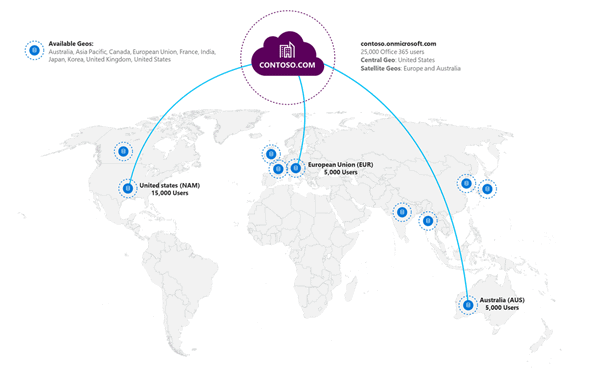
Microsoft 365 Multi-Geo allows Office 365 tenants to a primary central location and one or more specific satellite locations for their data. This can be helpful to meet data residency requirements for multi-national organizations. For example, needing to keep German users data in Germany. or EU users data within the EU.
Multi-Geo was initially launched with support for Exchange Online and OneDrive in 2018, but now Microsoft Teams support has been added.
The tenant’s central location is based on where the Microsoft 365 subscription was originally provisioned and satellite locations are selected by tenant admins. This is set by setting each user’s Preferred Data Location (PDL) – A user property set by the administrator that indicates where the geo-location where the user’s data should be provisioned e.g,. their mailbox, their OneDrive, their SharePoint sites and now their teams.
Microsoft 365 Multi-Geo is an extra cost licence and is available as an add-on for Enterprise Agreement customers. It is not currently available to CSP customers.
How does Multi-Geo work with Microsoft Teams?
Teams Multi-Geo is seamless to the end-user. They will not really be aware of where data is stored.
Private Chat (one-to-one, one-to-many, and private meeting messages) will all be stored in the Geo of the PDL of the user. The storage location for one-to-one or one-to-many chat is based on the PDL of the person who created the chat.
Meeting chat the organizer of the meeting is the data “owner” and the PDL of the organizer will determine where the meeting chat data sits
For private and meeting chat, if that user’s PDL is changed, the chat will be automatically migrated to the new geolocation. If the PDL or licence is removed, data will migrate back to the primary tenant location.
Teams and channel messages and associated SharePoint site will be stored in the PDL of the Office 365 group for that team. Each Microsoft 365 group has a Preferred Data Location (PDL).
When a user creates a new team, that user’s PDL determines what PDL is assigned to the Microsoft 365 group. This happens at the time of group creation and does not change if the creator’s PDL later changes.
Private channels created in a team will respect the PDL of the team, regardless of the PDL of the user to creates the private channel.
For existing teams, an administrator can add or modify the PDL for the Microsoft 365 group that backs a team, that team’s channel messaging data (including any private channel) is added to a migration queue to be moved to the specified geolocation. However, this does not migrate the SharePoint site or files associated with the Group automatically. You must move the site separately by following the procedures in Move a SharePoint site to a different geo-location.
Calls and Meetings – Note that Microsoft 365 Multi-Geo is not designed for performance optimization, it is designed to meet data at rest residency requirements. Indeed it will not affect where your online meetings are hosted or calls are routed. Here is a blog that explains Where in the world your Microsoft Teams meeting be hosted
What Microsoft 365 Multi-Geo locations are available?
The following geos are available:
| Geolocation | Code | eDiscovery data location |
|---|---|---|
| Asia-Pacific | APC | Southeast or East Asia datacenters |
| Australia | AUS | Southeast or East Asia datacenters |
| Brazil | BRA | (eDiscovery data location coming soon) |
| Canada | CAN | US datacenters |
| Europe / Middle East / Africa | EUR | Europe datacenters |
| France | FRA | Europe datacenters |
| Germany | DEU | Europe datacenters |
| India | IND | Southeast or East Asia datacenters |
| Japan | JPN | Southeast or East Asia datacenters |
| Korea | KOR | Southeast or East Asia datacenters |
| North America | NAM | US datacenters |
| Norway | NOR | (eDiscovery data location coming soon) |
| South Africa | ZAF | Southeast or East Asia datacenters |
| Switzerland | CHE | Europe datacenters |
| United Arab Emirates | ARE | Southeast or East Asia datacenters |
| United Kingdom | GBR | Europe datacenters |
Reference
Multi-Geo capabilities in Microsoft Teams
Microsoft blog: Microsoft Teams now included in Microsoft 365 Multi-Geo!
Thanks for sharing this article with us.
[…] Microsoft Teams Microsoft 365 Multi-Geo GA […]