An old tip, but one that I needed reminding of. By default Skype for Business clients record meetings, content and video at 15fps and 720p. This gives you a feel of the video and content, but can feel a bit “jerky” for video.
Example of a 15 fps SfB client recording:

You can up the resolution in Skype for Business client options,

However, to change the fps to 30 you need to change the following registry key:
For Skype for Business 2016 clients:
\HKEY_CURRENT_USER\Software\Microsoft\Office\16.0\Lync\Recording
For Lync 2013 / Skype for Business 2015 clients
\HKEY_CURRENT_USER\Software\Microsoft\Office\15.0\Lync\Recording

Source for reg key: https://blogs.technet.microsoft.com/nexthop/2017/02/14/when-a-recording-is-published-using-lync-or-skype-for-business-20152016-the-quality-seems-sub-par-deteriorated-or-jerky/
You will then get recordings in 30 fps:
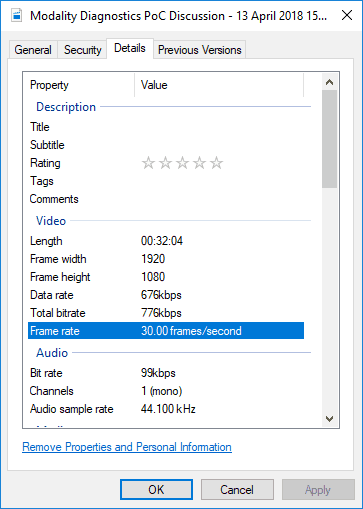
This does mean bigger file sizes and longer encoding, so you should consider that trade off.
Be First to Comment