I use a couple of great Plantronics headsets, mainly the Voyager 8200 and Voyager 5200 UC. I use Plantronics Hub windows software, which allows you to update the firmware, set some advanced functionality and even do device reporting into their Manager Pro product (which we can pull into Modality Diagnostics).
![image_thumb[2]](https://tomtalks.blog/wp-content/uploads/2019/03/image_thumb2-4.png "image_thumb[2]")
One thing that annoyed me was mute and unmute both pings a “toast” and makes a windows sound to notify you. In Teams I try to stay on mute when not talking, so am frequently on and off mute.
![image_thumb[5]](https://tomtalks.blog/wp-content/uploads/2019/03/image_thumb5-4.png "image_thumb[5]")
The headset already gives an in-ear “mute on”, “mute off” (configurable). I don’t need a toast and windows noise.
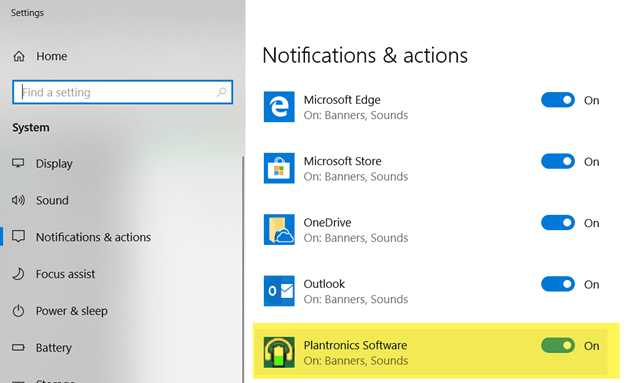
I was looking in the Plantronics Hub software for the ability to disable this bit couldn’t find it. Thanks to my friend Randy Wintle at Plantronics/Polycom for pointing out these can be disabled in the windows notification center
Disable them here and the toasts and noises for mute/unmute go away 
![image_thumb[8]](https://tomtalks.blog/wp-content/uploads/2019/03/image_thumb8-3.png "image_thumb[8]")
Thanks this helped me :)
This helped also me a lot. Thanks!!!
This does not work on Voyager Focuc UC. I still get the annoying toasts.
Did you find a solution?
This does not work on C720 either….
Does not work on the 3210 either.
This does not work on C720 either….
you rock – thanks
Thanks for your advice. I have found this settings on my own, it works for me too.
This behavior is really annoying, if you have a friend at Plantronics/Polycom I suggest you to ask him to have configurable options in their software, or at least have a hint how the user can switch it off.
You can also just click the application name, and then you’ll have an option to turn the sounds off but leave the toasts on.