
I’m not sure how this feature passed me by up until now. Differencing Disks are like VMware Linked Clones, you have Parent VHD and a number of linked VHD\VHDX for VMs that only record the changes from the Parent. A full Server 2008 R2 VHDX is around 11GB, a sysprep’d Differencing disk is around 1GB, meaning more machines in less space, ideal for Test and Dev. I’ve now got a SSD in my lab Server (which makes a huge difference in performance when running multiple VMs). I was looking into Server 2010 dedupe, but found that is only for VHDs at rest, i.e. libraries of VHD images, not live in use disks. With differencing disks I can make much better use of my SSD.
So how do you create a VM with differencing disks? First you start with a Master or Parent disk. I have a sysprep’d Server 2008 R2 VHDX. Mark it as read only so you don’t inadvertently change it. If you do all the child disk will be unusable.

The Easy way to do this is PowerShell:
# Create the VM (with no VHD at this stage)
New-VM –Name lab50-PSDiffDiskVM –MemoryStartupBytes 1024MB -SwitchName “INTERNAL LAN” -Path T:\lab50\lab50-PSDiffDiskVM -Verbose
# Create our New Differencing Disk
New-VHD –ParentPath T:\02R2June2012\08R2TemplateJune2012.vhdx –Path T:\lab50\lab50-PSDiffDiskVM\lab50-PSDiffDiskVM.vhdx -Differencing

# Attach this Disk to the VM
Add-VMHardDiskDrive lab50-PSDiffDiskVM -Path T:\lab50\lab50-PSDiffDiskVM\lab50-PSDiffDiskVM.vhdx
# Start VM
Start-VM lab50-PSDIffDiskVM

Want to go the GUI route?
You can’t create a differencing disk during the standard new VM wizard
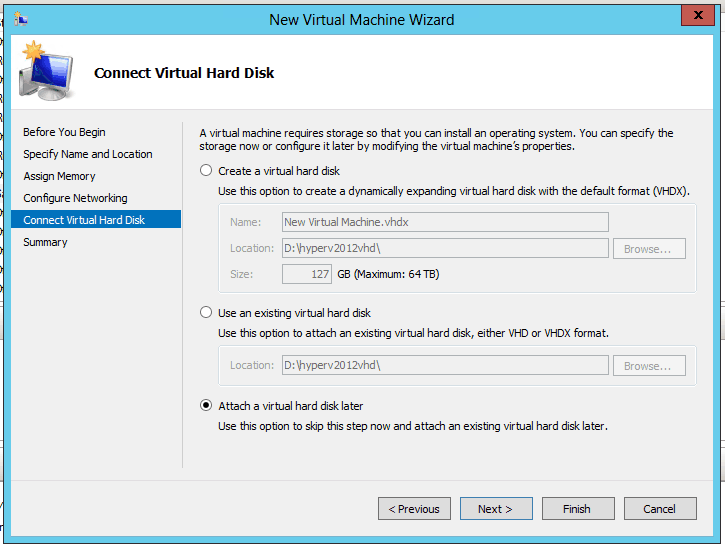
You can either create the disk first;

Or create the VM, then go into the New disk option;

Either way you end up at this wizard
![clip_image001[6]](https://tomtalks.blog/wp-content/uploads/2012/06/clip_image0016.png "clip_image001[6]")
![clip_image002[6]](https://tomtalks.blog/wp-content/uploads/2012/06/clip_image0026.png "clip_image002[6]")
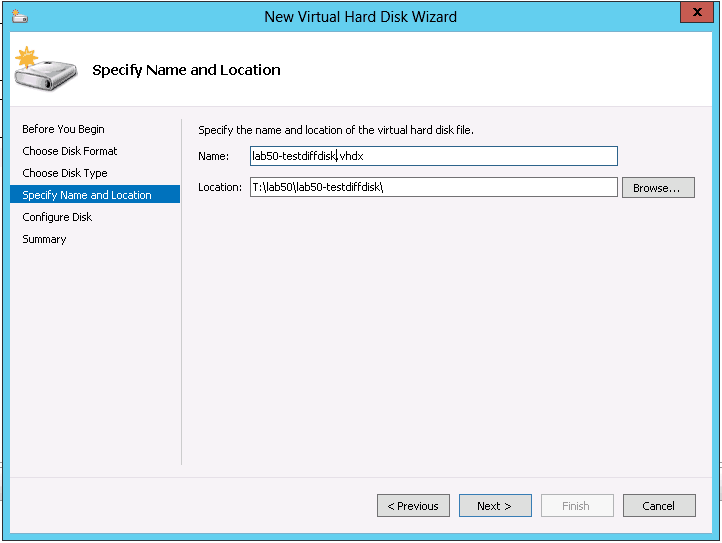

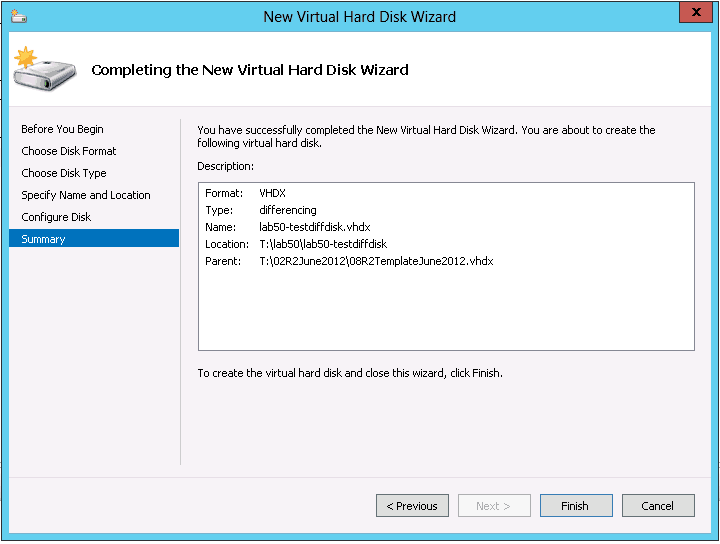
You then attach this disk to your VM

The disk starts at 4MB. After the machine is sysprep’d and hostname changed, the disk goes up to around 1GB (compared to 11GB for the full image)

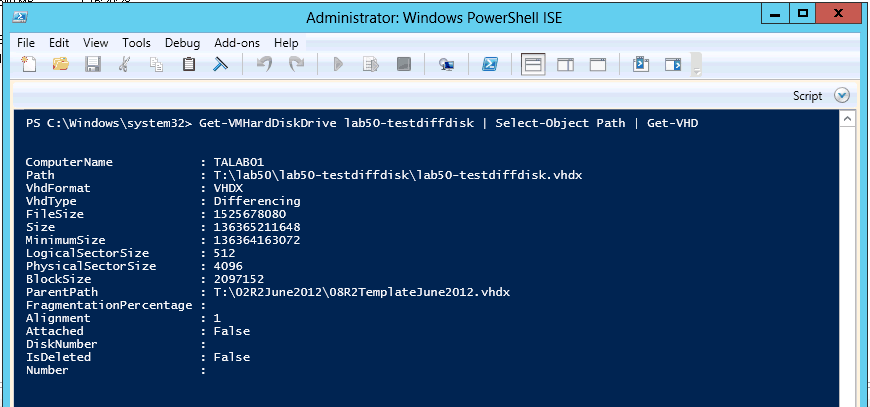
How do you know a VM is using a differencing disk? It’s in the properties
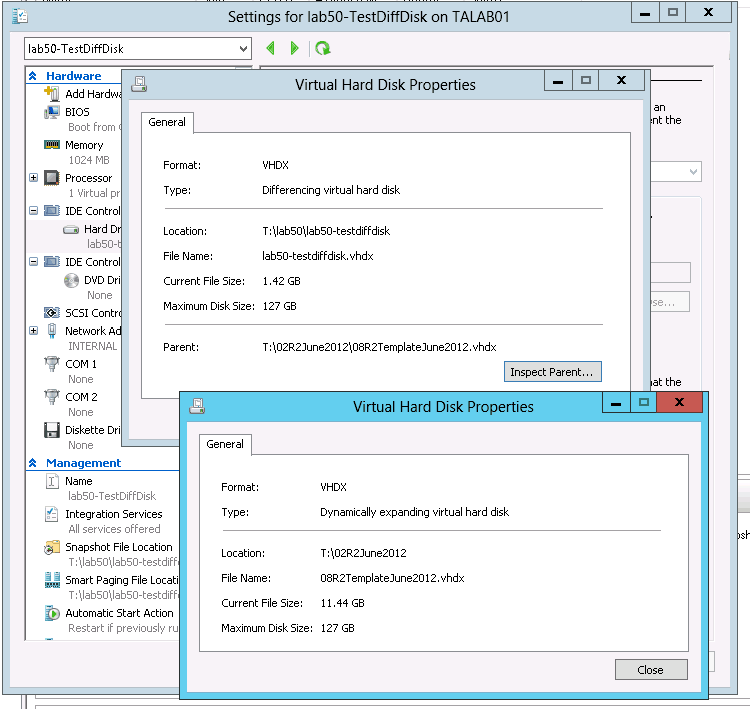
And here is the PowerShell way:
Get-VMHardDiskDrive <VMNAME> | Select-Object Path | Get-VHD
[…] with GUI and PowerShell July 14, 2012 robertrieglerwien Leave a comment Go to comments https://tomtalks.mystagingwebsite.com/2012/06/creating-hyper-v-3-differencing-disks-in-server-2012-with-gui-and-powersh… Share this:PrintEmailLike this:LikeBe the first to like this. Categories: MS: Server OS […]
Hi Tom, great article, thank you for sharing! I was wondering if there was a way to achieve this, for example, in App Controller? I would love to be able to simply deploy a server from a template (or a service) using the differencing disk. The transparency that was achieved in the VMware Lab Manager and later in the vCloud Director 1.5 with the Linked Clones deployments was just amazing and easy to use even for a non-technical person. Was wondering, for example if there was a way to create a Template and then deploy every subsequent VM form that template as a differencing disk? Of course, for DEV/TEST type efforts. Any thoughts? Thank you.
Hi,
I’ve written a PowerShell script to do this, it’s not quite tidy enough for public consumption yet, but when I get time I will post it.
cheers
Tom
Thanks!
Cool Tim. Thanks! Really, really useful article.
[…] https://tomtalks.mystagingwebsite.com/2012/06/creating-hyper-v-3-differencing-disks-in-server-2012-with-gui-and-powersh… […]
Tom, does it works fine for lync and exchange deploy ? sometimes we got failures using syspreped images for lync, exchange and SQL (when some services fails without precedent)
regards,
Thiago
No reason it shouldn’t the System should be unaware of the disk type, and it should be sysprep’d before Exchange goes on. Not for production though.
Tom
Tom:
Great article and nice job outlining how this works. Is it possible to take this one step further and somehow update the parent vhdx so that you don’t have to patch each and every differencing disk VM? I know you said it breaks the child VM but I am looking for something like VMWare’s linked clones update (http://pubs.vmware.com/view-50/index.jsp?topic=/com.vmware.view.administration.doc/GUID-74EE5875-51CD-45C1-8206-9CA27FB7856C.html)
Thanks for your help.
Dan
Hi Dan,
Don’t think this is possible on hyper-v, bit would be nice
Tom
Good article. The only thing I would add is that you have missed the step where you create your base disk. I am in the process of scripting this for win2012.
It’s just a windows install that is patched and sysprep’d, but your right it might be useful to add those steps.
I’ll add it to the to do list
thanks for feedback
[…] –> http://technet.microsoft.com/en-us/library/hh848503.aspxCreate Differeing disks –> https://tomtalks.mystagingwebsite.com/2012/06/creating-hyper-v-3-differencing-disks-in-server-2012-with-gui-and-powersh…Pass-trough disks –> […]
[…] –> http://technet.microsoft.com/en-us/library/hh848503.aspx Create Differeing disks –> https://tomtalks.mystagingwebsite.com/2012/06/creating-hyper-v-3-differencing-disks-in-server-2012-with-gui-and-powersh… Pass-trough disks –> http://www.petri.co.il/convert-hyper-v-pass-through-disk-to-a-vhdx.htm […]