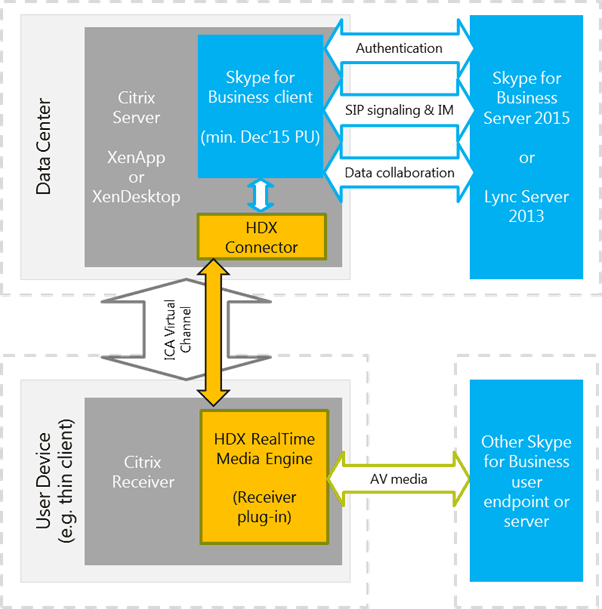
Citrix and Microsoft have worked together on the Citrix release of the XenApp/XenDesktop HDX RealTime Optimization Pack for Microsoft Skype for Business, which is now generally available.
The system requirements from Citrix are here:
http://docs.citrix.com/en-us/hdx-optimization/2-2/system-requirements.html
Server (backend)
- Microsoft Skype for Business server 2015
- Microsoft Skype for Business Online (Microsoft Office 365 hosted Skype for Business Server 2015)
- Microsoft Lync 2013 server – Updated to at least the February 2015 Cumulative Update. Citrix recommends updating to the most recent Cumulative update.
Client (the Skype for Business application installed on the XenApp or XenDesktop server)
- Microsoft Office Professional 2013 with Lync with at least the June, 2016 Microsoft Office Public Updates. Citrix recommends having the latest updates. The client must be configured in native Skype for Business UI mode.
- Microsoft Skype for Business 2015 stand-alone installer (which can be installed on top of Microsoft Office 2016) version 15.0.4833.1001 or later.
- Microsoft Skype for Business 2016 version 16.0.7341.2032 or later.
Which include “Skype for Business Online”, but no where does it specifically state if this includes “Cloud PBX”, i.e. PSTN telephony in SfB Online.
You could argue that “Cloud PBX” is just a feature of SfB Online (the ability to make and receive PSTN phone calls), therefore it is supported, but I’m looking to confirm it officially.
I’m currently trying to find out the official stance from Microsoft and Citrix, I will update here when I have the answer.

The Skype for Business Basic 2015 or 2016 clients are not supported with the Citrix HDX RealTime Optimization Pack.

https://technet.microsoft.com/en-us/library/mt740144.aspx

https://technet.microsoft.com/en-us/library/mt740144.aspx
https://support.citrix.com/article/CTX200279 – Citrix Skype for Business Feature Support
Be First to Comment